
Azure service principals (or App regs.) is nice secure way to connect to fx. a Azure SQL manage instance and then perform querys using PowerShell. This is an ideal alternativ to using a local Service Account. The upside to this is that you can authenticate with a secret or with a certificate that you create for yourself or the machine you are running your script(s) from.
Creating and setting up the Azure service principal – With PowerShell
You need the Application Administrator role in Azure to be to create the service principal and the PowerShell module
Create an Azure app identity (PowerShell) – Microsoft identity platform | Microsoft Docs
Creating and setting up the Azure service principal – Using the GUI
Create an Azure AD app and service principal in the portal – Microsoft identity platform | Microsoft Docs
Once the service principal been created, you dont need to assign API permissions to it. The next step is to add the service principal as user on the SQL managed instance.
Access the SQL server using SQL studio manager using a AD & AAD user account and open up a query on the database you wish service principal has access to and run the following query:
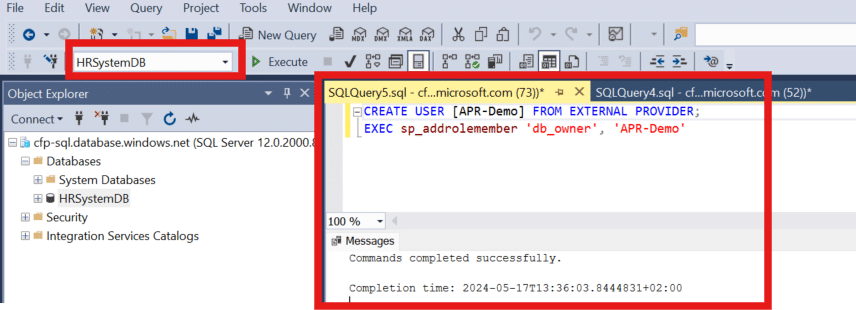
Now the service principal has owner access to the database of your choosing, you can change the permissions as you see fit.
Before you can access the the database you need to create a secret for the service principal. You can do that by accessing you Azure App reg. using the Azure AD Portal. When you have located you App reg. under “App registrations” navigate to the menu “Certificates & secrets” and then click on “New client secret” and select type in a description for the secret. When you are done, click then on “add” and copy value to notepad fx. you will no be able to see the secret again after you leave the page.
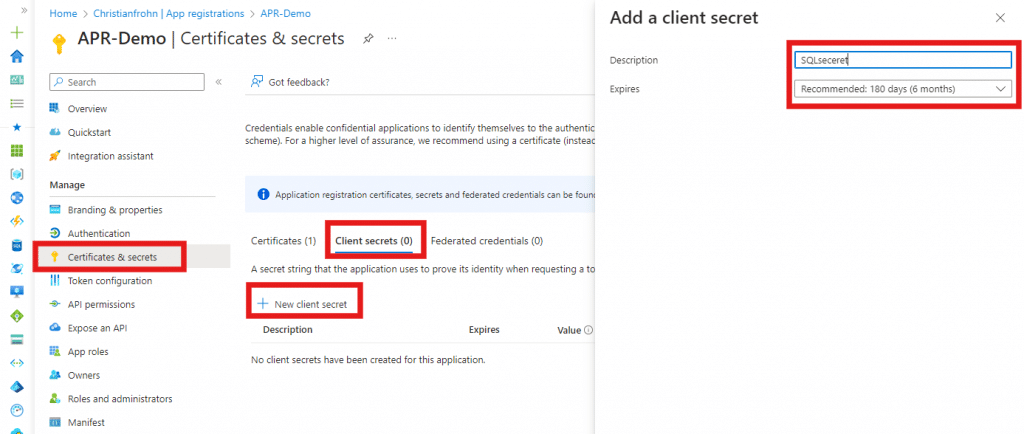
Now that we a a client secret the last next two things we need is the “Client ID” & “Tenant ID”, both can be found on the App reg. page when you select “Overview”. Now we are ready to use Powershell.
In order for you to access the database using PowerShell and the service principal, you need the following code in PowerShell:
Copy the code from above to PowerShell ISE or Visual studio code (dealers’ choice) and then fill out the variables with the information we have gathered above and the information of you Azure SQL managed instance and database.